Take a Virtual Tour
 Book a Demo

TL;DR: When new threat intelligence arrives, most security teams scramble to run retro hunts against historical logs. Those hunts are slow, incomplete, and miss anything outside the retention window. The root cause is not late intelligence. It is that most tools stop analyzing a file the moment the first scan finishes. Continuous malware intelligence eliminates the scramble. Every file your environment has ever seen stays preserved and continuously reanalyzed as new intelligence arrives. When a new campaign is identified, the answer is already waiting. No hunt required.
Every security team knows the drill.
A new threat report drops. Indicators get published. A researcher releases a YARA rule or a list of hashes tied to a campaign that has been active for months. The immediate question is simple:
Have we seen any of this new threat intelligence before?
The answer is rarely simple. Analysts start pulling logs. They query the EDR. They search historical telemetry across whatever retention window still exists. They reconstruct queries and try to determine whether those artifacts ever appeared in the environment.
This is the retro hunt. And for most organizations, it is slow, labor-intensive, and incomplete.
The problem is not that threat intelligence arrives late. It often does. The real problem is that most security tools stop analyzing a file the moment the first scan finishes.
Table of Contents
- The Point-in-Time Malware Analysis Trap
- Why Retro Hunts for Threat Intelligence Exist
- What is Continuous Malware Intelligence
- The Missing Foundation: Your File History
- Your Own Malware Corpus
- From One File to Every Variant
- YARA Detections at Ludicrous Speed
- The End of the Retro Hunt
- Frequently Asked Questions
The Point-in-Time Malware Analysis Trap
Traditional malware analysis is built around a moment in time.
A file appears. It is scanned, detonated, or checked against known indicators. A verdict is issued. The investigation moves on.
That model worked when environments changed slowly and malware intelligence evolved at roughly the same pace. It does not work now.
The analysis happened once, with whatever information existed at that moment. If new intelligence changes the meaning of that file later, nothing connects the dots automatically.
You analyzed the file. You just didn’t analyze it with everything you know now. That is the point-in-time trap. Retro hunts exist because of it.
Why Retro Hunts for Threat Intelligence Exist
Retro hunts are an attempt to recover hindsight.
When new intelligence appears, analysts go back and re-check historical data to see if the threat was present earlier. They reconstruct queries and search across logs, EDR telemetry, and threat intel platforms to answer a basic question: Did we miss this before?
In theory, this works. In practice, retro hunts are constrained by three things:
- Retention limits: the data may no longer exist
- Manual effort: analysts must rebuild the investigation each time
- Incomplete visibility: logs rarely preserve the full artifact
Even when a retro hunt succeeds, it often takes hours or days to confirm what happened. And by definition, the process is reactive. You run the hunt after new intelligence appears, which means you are always starting behind the threat.
Security teams deserve something better than racing their own data.
What is Continuous Malware Intelligence
Continuous malware intelligence flips the model. Instead of analyzing a file once and closing the investigation, the analysis never stops.
Every file your environment has ever seen remains available for re-evaluation. When new intelligence arrives, a new YARA rule, a new campaign, a new IOC, it is applied automatically across your entire historical corpus.
There is no retro hunt to trigger. The system is already doing it. This changes the fundamental question from “did we miss this?” to “the answer is already here.”
Investigations close. Threat actors move on. Only later does new intelligence reveal what really happened.
Continuous malware intelligence collapses that gap. When new intelligence appears, your historical detections update immediately. Files that were previously unknown get reevaluated. Connections between artifacts emerge automatically.
Consider a ransomware campaign that researchers determine has been active for eight months. With traditional tools, your team must reconstruct the search manually: pull historical logs, check retention windows, query multiple systems, correlate results. That process can take days, and the answer may still be incomplete.
With continuous reanalysis, the answer is already waiting. The new indicators were applied across your historical file corpus the moment they were ingested. If the campaign touched your environment at any point in time, the connection appears immediately. A retro hunt was never the goal. Finding an answer was.
The Missing Foundation: Your File History
Continuous malware intelligence requires something most organizations do not actually possess: a complete record of every file their environment has ever seen.
Logs cannot provide this. Logs capture events, not artifacts. They record that something happened, but not the file itself. When retention windows expire, the underlying evidence disappears with them.
Without the file, there is nothing left to analyze. Continuous hindsight requires something different: a persistent malware corpus. A complete inventory of every executable, script, and binary that has ever touched an endpoint. Without that corpus, hindsight is impossible.
Your Own Malware Corpus
This is where Stairwell’s architecture changes the model. Every file observed across your environment is preserved inside a Private Vault: a secure corpus that belongs only to your organization. It is not a public repository. It is not a crowdsourced ecosystem. It is your data and your threat intelligence.
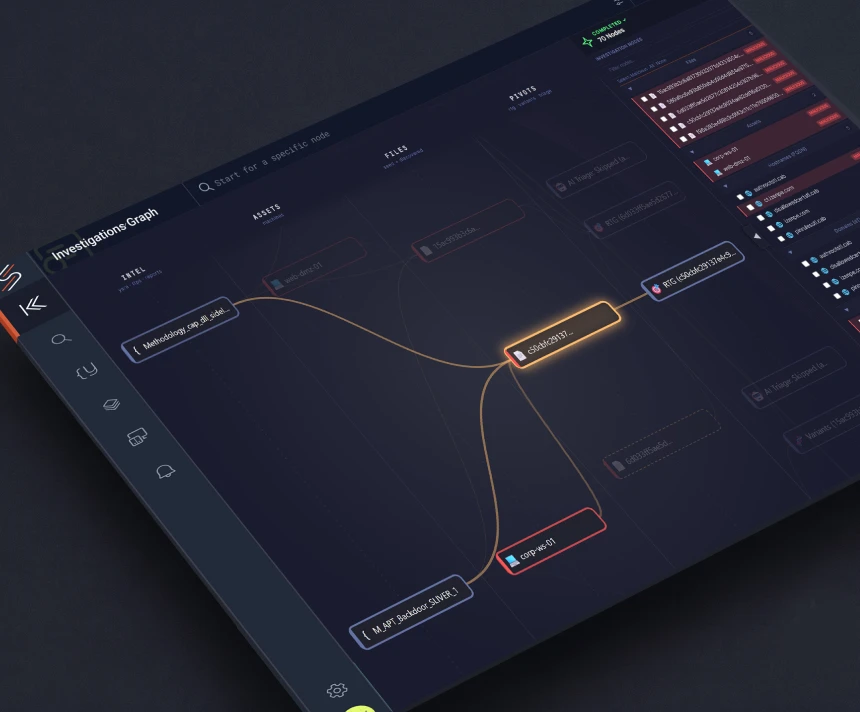
That corpus becomes the foundation for continuous malware analysis. Every new threat report, every new YARA rule, every new IOC is applied retroactively across your complete file history. Files that were ingested months or years ago are continuously reevaluated as the intelligence landscape evolves.
The result is that when a new campaign is published, you do not need to hunt for the answer. It is already there. The files were preserved. The analysis was running. The connection was waiting to be surfaced.
This is what Stairwell calls hindsight in real time.
From One File to Every Variant
One of the most critical capabilities continuous malware intelligence enables is the automatic follow-up question: Where else does this appear?
Attackers rarely reuse the exact same binary. They repackage payloads, re-sign executables, or introduce minor changes that generate a new hash. Traditional retro hunts attempt to find these variants using whatever indicators are available. Stairwell approaches the problem differently.
Variant Discovery identifies malware that looks like the original sample, not just files that exactly match its hash. Repacked payloads. Modified droppers. Re-signed binaries. Any variants sharing structural code patterns.
From a single artifact, analysts can see the entire malware family lineage. Every related sample that has ever appeared in the environment. That visibility does not require writing a query. It already exists.
YARA Detections at Ludicrous Speed
YARA has long been one of the most powerful tools in threat hunting. It is also one of the most difficult to operationalize at enterprise scale. Running YARA across large historical datasets traditionally requires significant infrastructure and coordination. Stairwell removes that constraint.
Write a rule once and it runs across your entire corpus instantly. Existing files are evaluated retroactively. New files are matched continuously. Results appear without scheduling or manual hunts.
Retroactive YARA scanning becomes permanent, not periodic. This is what continuous threat hunting should look like.
The End of the Retro Hunt
Retro hunts will never disappear entirely. Some investigations will always require custom analysis and manual follow-through. But the core premise behind retro hunting, that historical detection requires a reactive search triggered by new intelligence, no longer needs to exist.
When your file history is preserved and your analysis runs continuously, new intelligence doesn’t trigger a scramble. It produces an answer. Security teams should not be racing to rediscover what already happened inside their own environments. They should already know. That is what continuous malware intelligence provides: hindsight in real time.
Frequently Asked Questions
What is continuous malware intelligence?
It is a model where file analysis never stops. Every executable your environment has ever seen is retained in a private corpus and continuously reanalyzed as new intelligence arrives. When a new campaign, IOC, or YARA rule is published, it is automatically applied across your full file history. You do not run a hunt. The answer is already there.
How is this different from a retro hunt?
A retro hunt is reactive. New intelligence appears, an analyst builds a query, and the team searches historical logs to see if the threat was present. The process takes hours or days, depends on what data still exists, and has to be repeated every time new intelligence arrives. Continuous malware intelligence does all of that automatically, in real time, against a persistent file corpus that never ages out.
What do you actually need to make this work?
The files themselves. Logs are not enough. Logs record that something happened. They do not preserve the artifact. Continuous malware intelligence requires a complete, persistent inventory of every executable, script, and binary that has ever touched an endpoint. Without that corpus, there is nothing to reanalyze.
Does this replace our EDR or SIEM?
No. EDR and SIEM remain part of the stack. What continuous malware intelligence adds is the analytical depth and historical reach that log-based tools cannot provide. When a threat report surfaces a campaign that started eight months ago, your EDR alert from that period may still exist. The file it referenced almost certainly does not. Continuous malware intelligence fills that gap.
What happens when files fall outside the log retention window?
Nothing changes. Because the files themselves are preserved in a private vault, they remain available for analysis regardless of how long ago they appeared. Retention windows apply to logs. The file corpus does not expire. That is the entire point.
Is this the same as a sandbox?
No. A sandbox detonates a file and records what happens during execution. That is useful for individual triage. Continuous malware intelligence operates at a different layer. It retains every file across your entire environment, applies new intelligence retroactively, detects variants through code similarity, and maintains permanent visibility across your full file history. It is not a detonation tool. It is the foundation that makes retroactive analysis possible.
How fast does YARA run?
Fast enough to be operational, not just theoretical. Write a rule once and it runs across your entire historical corpus immediately. Existing files are evaluated retroactively. New files are matched as they arrive. There is no scheduling, no infrastructure setup, and no manual hunt to trigger. Retroactive YARA becomes a continuous capability, not a periodic project.
What does “hindsight in real time” actually mean?
It means that when new threat intelligence arrives, you do not have to go looking for the answer. The answer is already there. Because your file history is continuously reanalyzed as intelligence evolves, a newly published campaign that turns out to have been active for six months will immediately surface any related files that touched your environment during that window. You gain retroactive clarity the moment the intelligence is available, not days later after a manual hunt.