Take a Virtual Tour
 Book a Demo


TL;DR — Stairwell AI Triage is a labeled feature inside the Stairwell platform. It analyzes a file’s structure, logic, and intent without executing it, and returns a plain-English explanation of what the file does. It runs in seconds. It does not detonate. It sits between a simple hash lookup (like VirusTotal) and full sandbox detonation. Some call it sandbox lite, but for many investigations, it eliminates the need for a sandbox entirely.
Key outputs from file analysis: TLDR summary, malicious likelihood score, confidence score, MITRE ATT&CK mapping, IOCs, prevalence signal, and recommended analyst actions.
Table of Contents
- What Is Stairwell AI Triage
- How AI Triage Works
- What is the AI Triage Report Output?
- The Prevalence Signal Explained
- Where AI Triage Sits in the Stack (vs. VirusTotal, Sandbox, EDR)
- When to Use AI Triage
- How AI Triage Benefits Each Security Role
- How AI Triage Trains Analysts Over Time
- Privacy and the Private Vault
- Frequently Asked Questions
1. What Is Stairwell AI Triage?
AI Triage is a Stairwell-coined capability and a labeled feature inside the Stairwell platform. It was built to answer the question every analyst asks when an alert fires: Is this file bad, and what does it do?
Traditional file analysis answers the first question and gives you a verdict. A thumbs up or a thumbs down. Stairwell AI Triage goes further and answers the second question and delivers the reasoning behind the verdict. It reads the file and writes a plain-English explanation of its structure, intent, and behavior, without ever executing it. Think of it as the step between a hash-look up (like VirusTotal) and detonating the file in a sandbox.
The name reflects what it does. It triages. It takes an unknown or suspicious file and produces enough structured output for an analyst to make a confident decision. AI Triage is cheaper and much quicker than using a sandbox. For many security analysts, AI Triage eliminates the need for a sandbox detonation in the majority of cases.
2. How AI Triage Works
AI Triage performs static analysis on the file itself. It is not a sandbox run nor a detonation. Instead, the file is read directly.
This matters because modern malware often actively evades and refuses to perform in sandbox environments. Instead it detects virtual machines. It waits. It needs user interaction. It uses conditional triggers. A sandbox can only tell you what a file does when it chooses to run. AI Triage tells you what the file is built to do, regardless of whether it ever runs.
To draw an analogy. If a file is the script of a play, a sandbox is the actual performance. A performance can change. A script cannot.
AI Triage reads the script of the play.
What does static analysis actually evaluate?
AI Triage analyzes each file across several dimensions:
- File structure and binary composition
- Imported libraries and system calls
- Code logic and execution pathways
- Embedded strings and command patterns
- Indicators of compromise
- Behavioral intent inferred from file design
The output is not raw data. It is synthesized by an LLM into a structured explanation an analyst can act on immediately.
How long does it take to invoke AI Triage?
Inside the Stairwell platform, when a file or alert is open, a “Run AI Triage” action is available. One click. Results in seconds.
3. What is the AI Triage Report Output?
This is where AI Triage is most different from other tools. It does not return a score in isolation. It returns a structured report an analyst can read and act on. Below is an alternative real example of the kind of output produced.
AI Triage Report
TL;DR
This is a highly suspicious file. A malicious payload or red team tool, as evidenced by its internal PDB path containing the keyword “payload.” It is designed to execute commands via the Windows command shell and perform privilege discovery using token-related APIs. Its presence in multiple malware feeds and low prevalence further support its classification as a threat.
Malicious Likelihood: 85% | Confidence: 90% | Classification: Trojan
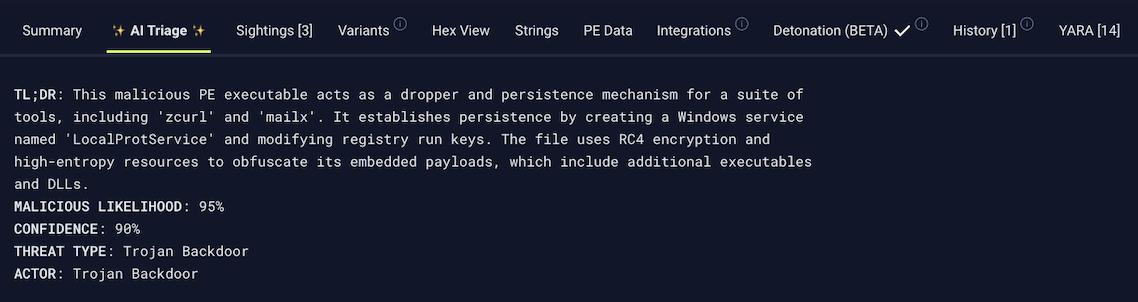
After the TL;DR, the full AI Triage report output includes the items below.
| AI Report Content | What It Tells You |
|---|---|
| TLDR Summary | Plain-English explanation of what the file does and why it is suspicious or clean. |
| Malicious Likelihood | A percentage score indicating how likely the file is to be malicious, based on structural and behavioral analysis. |
| Confidence | How confident the analysis is in that likelihood score. High confidence means strong signals. Lower confidence flags ambiguity. |
| Threat Type Classification | File type classification: Trojan, loader, dropper, red team tool, clean utility, etc. |
| Prevalence | How often this file or similar files appear across the environment and broader corpus. Low prevalence is a threat signal. |
| IOCs | Extracted indicators of compromise: hashes, domains, IPs, registry keys, file paths. Ready for blocking or further investigation. |
| MITRE ATT&CK Mapping | The specific tactics and techniques the file is built to execute, mapped to the MITRE ATT&CK framework. |
| Considerations | Contextual flags and additional signals that inform the verdict, such as appearance in known malware feeds. |
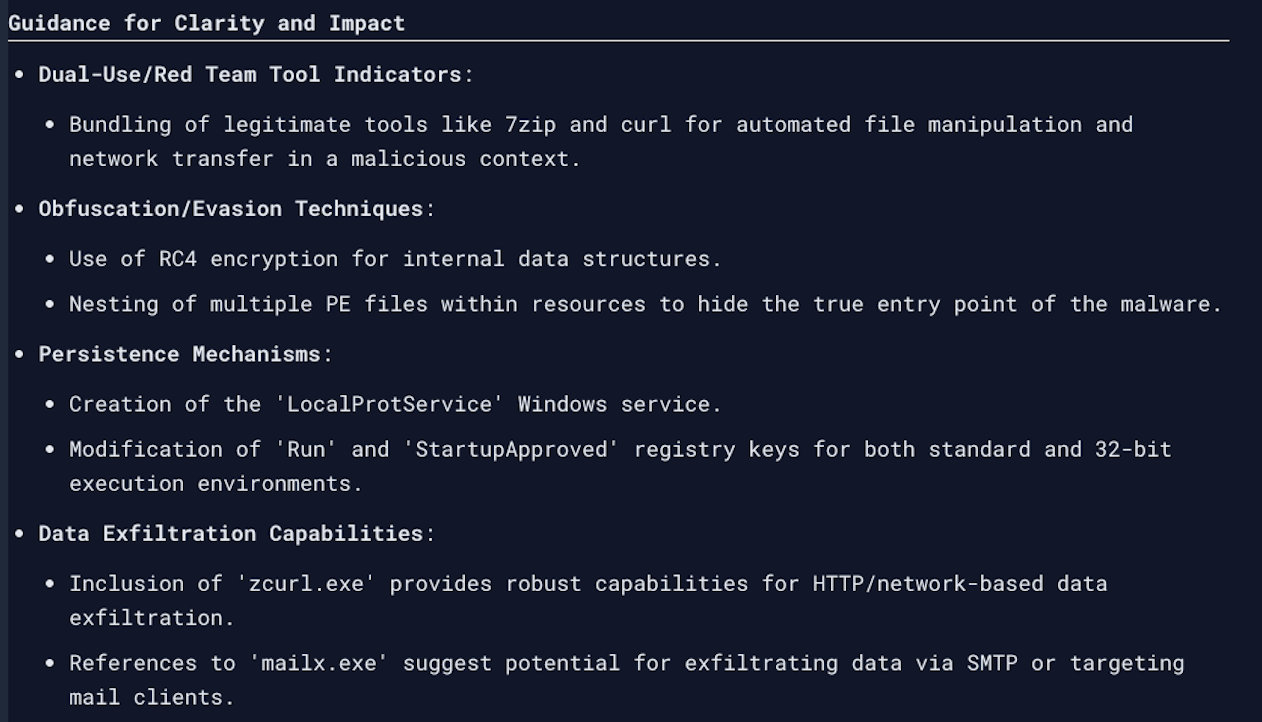
| Guidance | Analyst-facing recommended next steps based on the findings. |
It also includes guidance. AI Triage does not just classify. It tells the analyst what to do next.
4. The Prevalence Signal Explained
Prevalence is one of the most important signals Stairwell uses to evaluate a file. It is worth understanding clearly.
Prevalence measures how often a file appears across the environment and across Stairwell’s global corpus. The logic is straightforward:
- A file seen on thousands of endpoints is probably a common application (think notepad.exe or a common system utility). High prevalence points toward benign.
- A file seen on one machine, included in no known malware feed, and nowhere else in any environment Stairwell has seen, is far more suspicious. Low prevalence is a threat signal.
Malware targeting a specific organization is often engineered to be unique. That uniqueness is detectable. Prevalence is one of the key techniques Stairwell uses to surface it.
This is also why Stairwell’s Private Vault matters here. Because every file from every endpoint is retained, Stairwell can calculate prevalence across the full history of the environment, not just what is on disk right now.
5. Where does AI Triage sit in the threat intelligence stack?
AI Triage occupies a deliberate position between two existing tools most security teams already use.
| Tool | What It Does | What It Misses |
|---|---|---|
| VirusTotal | Fast hash lookup. Returns detection ratios from vendor signatures. Tells you if something is known bad. | No explanation of behavior. No insight into what the file actually does. No understanding if this file is in your environment. |
| Stairwell AI Triage | Analyzes file structure and intent. Returns plain-English explanation, likelihood score, MITRE mapping, IOCs, and recommended actions. Runs in seconds without execution. Provides sufficient information and explanation for most security analysts. | Not a full detonation. For complex behavioral validation or live network traffic analysis, a sandbox may still be appropriate. |
| Sandbox (e.g., Joe Sandbox, Any.run) | Detonates the file in a container and observes live behavior. Detailed behavioral output when the malware cooperates. | Slow. Evasion-prone. Many modern malware samples detect sandbox environments and do nothing. Requires queuing and execution time. |
Security teams acknowledge that most investigations do not need a full sandbox run. AI Triage provides enough context to make a confident triage decision in the majority of cases. There are cases where a full detonation to see exactly what the file does and where it actually connects is valuable.
How does AI Triage compare to EDR?
EDR detects activity at runtime. It tells you when something executes on an endpoint and flags behavior that matches detection rules.
AI Triage tells you what a file is built to do, regardless of whether it has run yet. These are complementary capabilities, not competing ones.
- EDR catches execution as it happens.
- AI Triage explains the file before or after execution.
- Together: detection plus understanding, not one or the other.
EDR alerts are evidence of what happened. AI Triage reads the file before any behavior occurs.
Does Stairwell detect AI-generated malware?
Yes, Stairwell’s AI Triage is perfect for detecting novel, never-before-seen, AI generated malware. AI Triage does not rely on previously seeing the malware, and needing a signature, or behavioral rule in place. AI Triage works exactly the same on a brand new file as it does on an older file. It reads what it is built to do and determines what it will do once it runs. A brand new AI generated piece of malware will get the same analysis the moment it lands on a system. AI Triage works in the risk window before your EDR or AV creates a signature or rule to catch the new AI generated malware from the moment it is created.