WHY STAIRWELL

From one alert to the whole campaign

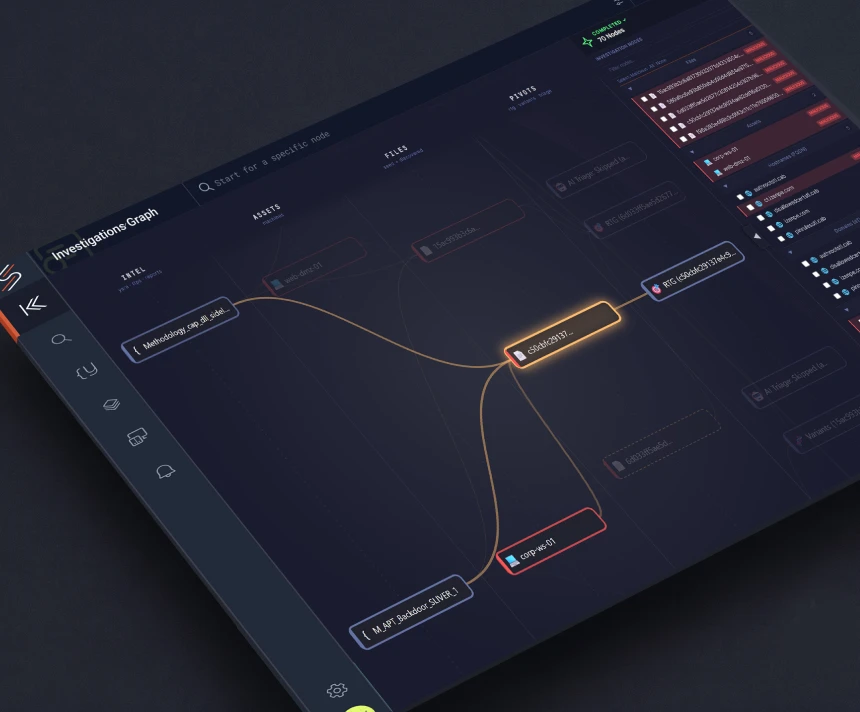
Stairwell preserves the files behind your alerts. Backstory analyzes the threat, finds related variants, maps the affected systems, and returns the evidence and remediation guidance your team needs to close the case.

Start with the evidence
your other tools miss

Alerts tell your team where to look. They do not preserve the file, find every related variant, or show the full scope of a campaign.
Stairwell starts with the files themselves, keeps the evidence, and makes it available for investigation whenever new intelligence arrives.

Detect files that
never generated an alert

Stairwell preserves and analyzes executable files independently of your other security tools. A suspicious file can still surface even when another product never flagged it.

Find variants
conventional detections miss

Attackers rename, recompile, re-sign, repack, and modify malware to break exact hashes and common detections. Stairwell uses file structure, similarity, prevalence, historical context, and fresh intelligence to find related variants.

Re-evaluate old files
with new intelligence

Every new IOC, threat report, or YARA rule 
runs against the preserved file history. A file 
that looked harmless yesterday can still surface 
when the intelligence changes.

Stairwell

CONTAIN, REMEDIATE,

THE PROBLEM

CLOSING A TICKET
IS NOT THE SAME AS
CONTAINING THE THREAT

EDR and SIEM alerts tell analysts where to begin. They rarely answer the questions that determine whether a case is contained:

What does the file do?

What else looks like it?

Which hosts have seen it?

How far did it spread?

What should the team block or remove?

Faster triage, lower MTTR, and more closed tickets measure how efficiently the team handles known work. They do not show what the tools missed or whether the original alert represented the full incident.

Stairwell expands the investigation from the original file to related variants, affected hosts, and historical activity so the team can define a defensible remediation scope.

INTRODUCING

The first AI investigator built on evidence

Backstory investigates the files that have touched your environment. It analyzes the initial sample, finds related variants, identifies affected hosts, reconstructs the campaign timeline, and returns remediation guidance supported by the evidence behind each conclusion.

Every executable remains available for future investigation and re-evaluation.

HOW IT WORKS?

From preserved evidence to a complete investigation

Stairwell collects and preserves the evidence. Backstory analyzes the file, expands the investigation, 
maps the affected systems, and sends the findings back to the tools your team already uses. New intelligence starts the process again across the preserved history.

Bring in the alert and file

Use the Stairwell Forwarder, an EDR integration, an API, or a manual upload to bring suspicious files and detections into your private environment.

Understand the file

AI Triage analyzes the file’s structure, logic, intent, prevalence, and indicators. Analysts receive a plain-language explanation, a malicious-likelihood verdict, MITRE ATT&CK mapping, and recommended next steps.

Expand to the campaign

Backstory finds renamed, recompiled, repacked, or modified variants, then maps where those files appeared across hosts and time.

Return the answer to the SOC

Send verdicts, rule matches, affected hosts, and remediation guidance to the SIEM, SOAR, or case-management platform that already drives response.

Re-evaluate the preserved history

When new intelligence, IOCs, reports, or rules arrive, Stairwell checks the preserved file history again. A file that looked harmless yesterday can still surface tomorrow.

ANSWER THE QUESTIONS
THAT DETERMINE WHETHER
A CASE IS CONTAINED

WHAT’S HIDING
THAT NOTHING
ALERTED ON?

Analyze files independently of alert generation so suspicious executables can still surface even when another security product misses them.

ARE WE
AFFECTED BY
THIS CAMPAIGN?

Connect the initial file to related variants, indicators, historical sightings, and affected hosts to determine whether the campaign is present in your environment.

HOW FAR
DID IT
SPREAD?

Map where related files appeared across hosts and time to understand the full blast radius.

DID
WE GET
EVERYTHING?

Re-evaluate preserved evidence against new indicators, reports, and rules so the investigation does not stop at what was known when the original alert fired.

WHAT SHOULD
WE BLOCK OR
REMOVE?

Close the investigation with concrete recommendations for containment, blocking, and cleanup, supported by the evidence behind each conclusion.

BUILT ON A DATA ADVANTAGE
THAT COMPOUNDS

Years of preserved evidence, global malware context, and detection
at scale power every investigation.

2B+

FILES

Preserved file evidence provides historical context for investigation and re-analysis.

1 TB

SCANNED

Private and public detections run continuously across files at scale.

100K+

YARA RULES

A broad detection library continuously evaluates preserved evidence.

2.4 x

MORE MALWARE
FOUND

On average, Stairwell’s Variant Discovery found 2.4 additional malicious files for every malware hash named in the reports studied.

YOUR ENTERPRISE FILES
STAY PRIVATE

Enterprise files remain in a dedicated private environment. They are not published to a
public repository or shared with other customers.

WHAT CHANGES
FOR THE SOC

SEE MORE
THREATS

Find related variants, repacked malware, and suspicious files that alert-dependent workflows leave behind.

INVESTIGATE
FASTER

Replace repeated pivots across sandboxes, reputation lookups, threat feeds, SIEM searches, and endpoint tools with one evidence-backed investigation.

RESPOND
WITH CONFIDENCE

Give response teams a defensible remediation scope instead of assuming the original alert represents the whole incident.

FREQUENTLY ASKED QUESTIONS

EDR alerts help analysts identify suspicious activity. Stairwell preserves and analyzes the files themselves, finds related variants, maps affected systems, and re-evaluates historical files as new intelligence arrives.

No. Stairwell works alongside the tools you already use. Alerts and files can come into Stairwell from existing security products, and verdicts, rule matches, affected hosts, and remediation guidance can flow back into SIEM, SOAR, and case-management workflows.

Stairwell uses file structure, similarity, prevalence, historical context, and fresh intelligence to find renamed, recompiled, re-signed, repacked, and modified malware.

Yes. New indicators, reports, and YARA rules can be evaluated against preserved file history, allowing analysts to find activity that was not known to be malicious when the file was first collected.

No. Enterprise files remain in a dedicated private environment and are not published to a public repository or shared with other customers.

CLOSE THE CASE,
NOT ONLY THE ALERT

See how Stairwell turns one alert into a complete investigation, maps the affected systems, and returns the evidence and remediation guidance to the tools your team already uses.