Take a Virtual Tour
 Book a Demo

Abstract
SOC automation tools help security teams investigate threats, reduce manual work, and coordinate incident response. The top 12 tools for 2026 fall into three categories:
- Autonomous SOC investigation: Stairwell, Simbian, Exaforce, and Stellar Cyber.
- Agentic orchestration and workflow automation: Torq, Tines, and Swimlane.
- Platform-native agentic SOC automation: Microsoft Security Copilot agents, CrowdStrike Charlotte AI, SentinelOne Purple AI, Google Security Operations with Gemini, and Cortex AgentiX.
The right tool depends on investigation depth, access to security evidence, historical visibility, and response controls, not simply how many tasks it can automate.
SOC automation tools are smarter than ever. Beyond the playbooks and alert triage, they can investigate threats, gather evidence, hunt for suspicious activity, and even coordinate response. But how much can they actually uncover?
Microsoft’s 2026 research found that 42% of security alerts go uninvestigated, while 66% of SOCs spend at least 20% of their working week on manual data aggregation and correlation. Automating more work isn’t the only challenge. You also need tools that investigate the right evidence and can independently uncover suspicious activity, giving analysts a chance to find what their existing defenses missed.
Top SOC Automation Tools picks by category
- Best for evidence-led investigation: Stairwell. Retains first-party executable-file evidence, finds related malware variants, and supports historical investigation beyond upstream alerts.
- Best for cross-tool agentic orchestration: Torq. Combines workflow automation, AI agents, triage, and response coordination across connected security products.
- Best for Microsoft-centric SOCs: Microsoft Security Copilot agents. Investigates supported phishing reports and security alerts using native Defender data and investigation tools.
Autonomous SOC investigation
Autonomous SOC investigation tools use AI to investigate threats and establish incident scope with limited analyst intervention. Some use AI triage to investigate existing alerts, while others analyze security evidence to uncover previously undetected threats. The key difference is whether a tool can discover threats on its own or only investigate what existing defenses have already flagged.
| Tool | Starting point | Evidence foundation | Independent detection | Historical investigation |
| Stairwell | Files, indicators, alerts | Retained executable files | Yes, file-based | Retained files and retrohunts |
| Simbian | Security alerts | Connected security and business systems | Primarily upstream-driven | Depends on connected data |
| Exaforce | Cloud/SaaS events and alerts | Unified security telemetry | Yes, native detection | Available ingested history |
| Stellar Cyber | Security telemetry | Open XDR data | Yes, native analytics | Platform retention dependent |
1. Stairwell
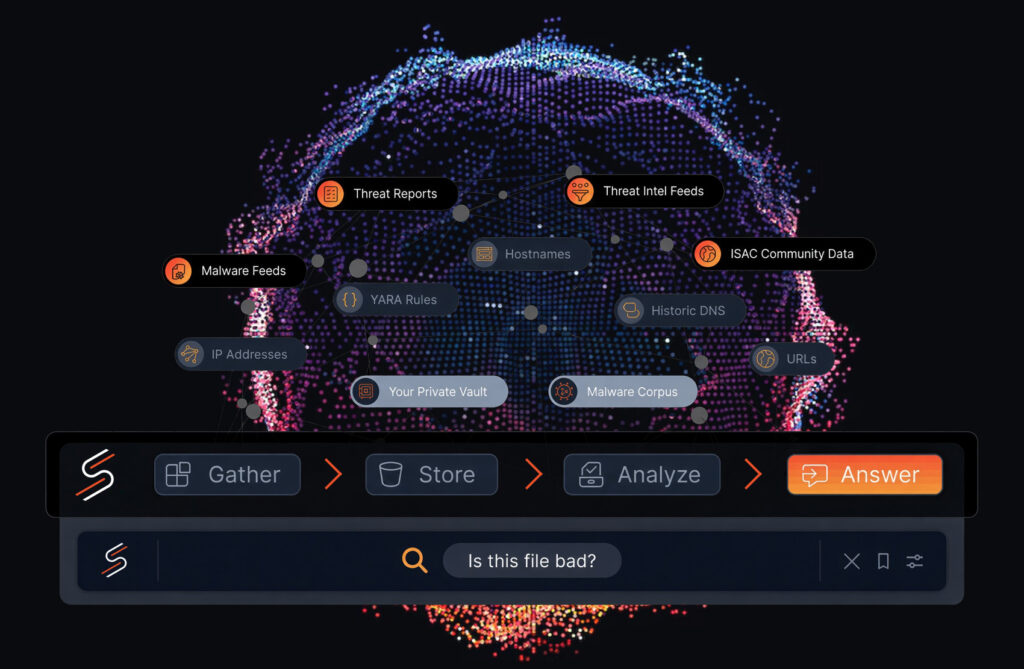
Best for: Enterprise SOCs, threat hunters, and incident response teams that need to uncover malware missed by existing controls and establish historical exposure.
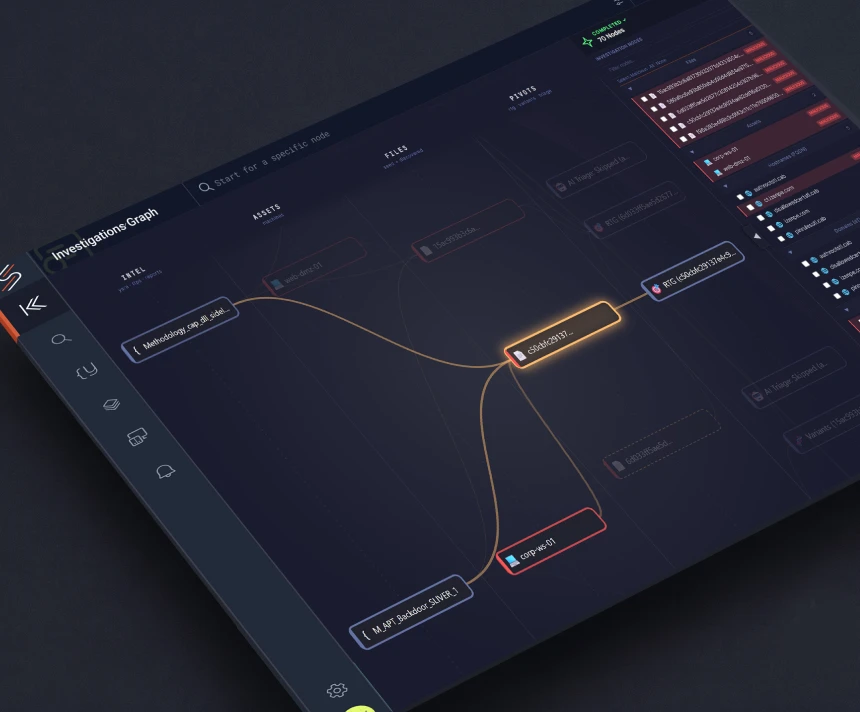
Stairwell takes an evidence-first approach to SOC investigation. It continuously collects and retains executable files, libraries, and scripts from the customer’s environment. The original artifacts remain available for analysis, even when existing security tools fail to flag them.
Its Backstory agentic investigator can start with an alert, indicator, or suspicious artifact and trace related activity across affected hosts. Variant Discovery uses file similarity to uncover related malware, while environment-specific prevalence helps distinguish unusual files from those commonly found across the organization. Retained evidence also enables retrospective investigations as new threat intelligence emerges.
Key capabilities
- Continuous executable-file collection and retention
- Variant Discovery using structural file similarity
- Environment-specific file prevalence analysis
- Backstory investigation and blast-radius mapping
- Historical rescanning with new intelligence and YARA rules
Strengths and considerations: The platform specializes in executable-file evidence, so it complements rather than replaces broader network, identity, and endpoint monitoring.
Evidence and review notes: Published customer feedback highlights its value as a second layer of malware detection and threat hunting. Customers particularly emphasize the confidence gained from investigating suspicious files beyond existing security alerts. Independent customer-review coverage remains limited.
2. Simbian
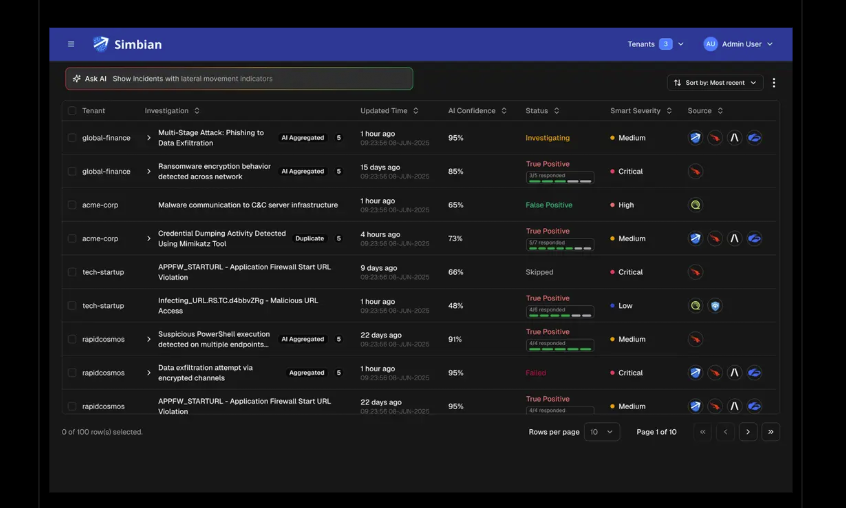
Best for: SOCs with high alert volumes that want an AI agent to investigate incoming detections across multiple tools without manually building a playbook for every alert.
Simbian uses an AI SOC Agent to investigate security alerts through connected SIEM, endpoint, identity, cloud, and other systems. Instead of applying only fixed enrichment steps, the agent can formulate investigative questions, retrieve supporting context, and decide whether an alert warrants escalation.
Key capabilities
- Autonomous multi-source alert investigation
- Security and business-context enrichment
- MITRE ATT&CK technique mapping
- Evidence-backed investigation verdicts
- Policy-governed response actions
Strengths and considerations: Simbian offers flexible, agent-led investigations without requiring a dedicated workflow for every alert type. It primarily automates investigation of surfaced signals; it doesn’t independently retain original malware evidence.
Evidence and review notes: Simbian earns positive feedback for automating investigations without requiring rigid playbooks. Reviewers appreciate its ability to adapt to unfamiliar alerts and carry context between investigative steps.
3. Exaforce
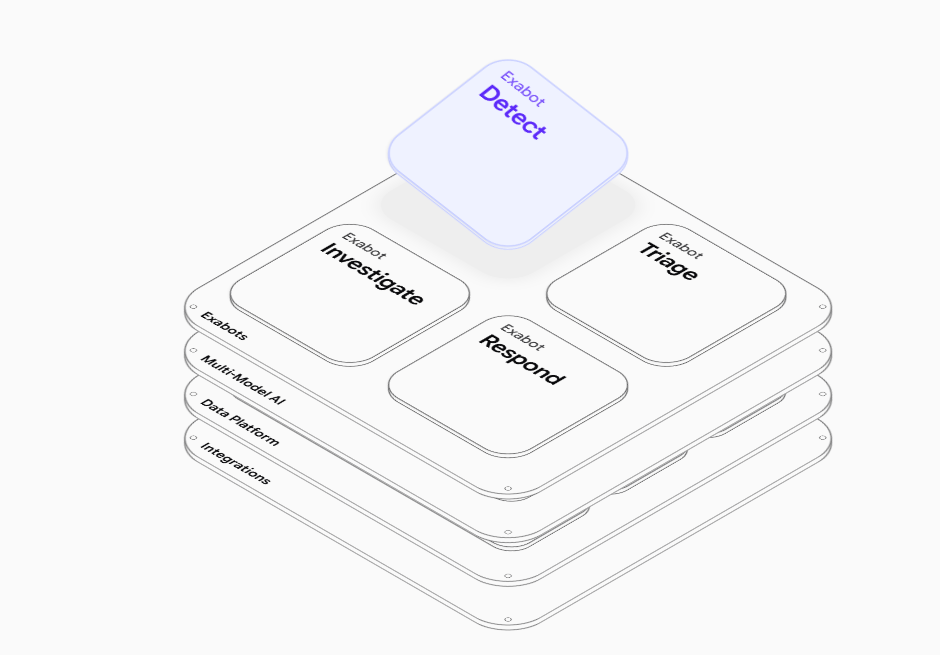
Best for: Cloud-focused SOCs investigating suspicious activity across infrastructure, SaaS, identity, and developer environments.
Exaforce combines a unified security data foundation with specialized AI agents called Exabots. Its architecture goes beyond an alert-triage agent because Exabot Detect can identify suspicious activity directly from supported cloud and SaaS telemetry. Other Exabots handle triage, investigation, and response. Attack Chains connect related events and findings to show potential progression across accounts, services, and resources.
Key capabilities
- Exabot Detect for behavioral threat detection
- Exabot Triage for alert correlation and disposition
- Attack Chains for multi-stage incident reconstruction
- Exabot Investigate for natural-language investigations
- Exabot Respond for automated remediation
Strengths and considerations: Exaforce combines native detection with agentic investigation and response across cloud and SaaS environments. Buyers should assess connector coverage and which response actions require approval.
Evidence and review notes: Exaforce reviewers frequently praise its ability to consolidate investigations and reduce alert noise. Reported challenges include integration gaps and occasional performance issues when working with large datasets.
4. Stellar Cyber
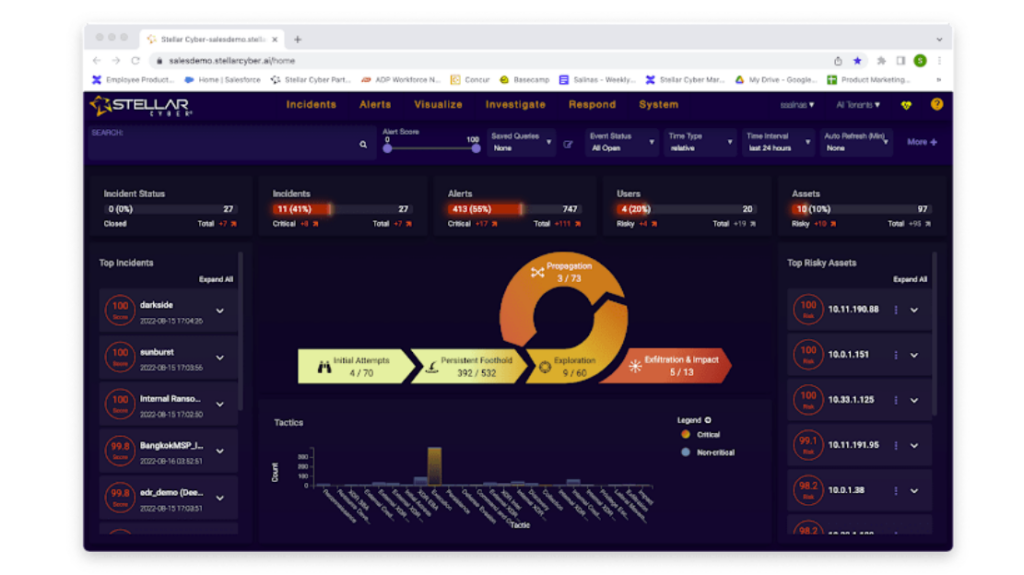
Best for: SOCs and MSSPs that want to consolidate multi-vendor security telemetry, detection analytics, and incident investigation within an Open XDR platform.
Stellar Cyber ingests security telemetry and applies native analytics to identify suspicious activity. Its Multi-Layer AI approach correlates signals across security domains, while network detection capabilities add visibility beyond endpoint alerts. It groups related detections into incidents so analysts can investigate the broader sequence instead of handling each signal separately.
Key capabilities
- Open XDR telemetry ingestion
- Network Detection and Response (NDR)
- Multi-Layer AI threat detection
- Automated alert correlation and incident grouping
- Multi-tenant MSSP investigation workflows
Strengths and considerations: Stellar Cyber’s model suits teams seeking a unified detection and investigation environment, though adoption requires more platform-level decisions than deploying an AI agent alongside an existing SIEM.
Evidence and review notes: Customers value the visibility gained from combining security telemetry within one investigation platform. Reviewers also appreciate spending less time switching between tools. Feedback points to interface complexity and occasional inaccurate event correlation.
Agentic orchestration and workflow automation
Orchestration platforms are designed for SOCs that already have detection tools but need to coordinate work across them. Automation typically starts with an event, a workflow trigger, or an analyst request, then uses connected APIs to enrich cases and execute actions. When comparing these products, consider how much workflow design is required and whether the response process includes approvals and audit records.
| Tool | Automation trigger | Investigation mechanism | Response governance |
| Torq | Events, alerts, agent tasks | HyperAgents and connected tools | Policy-controlled workflows |
| Tines | Events, schedules, manual triggers | Stories and AI Agent actions | Explicit steps and approvals |
| Swimlane | Events, cases, playbooks | Turbine and Hero AI | Permissions and governed actions |
5. Torq
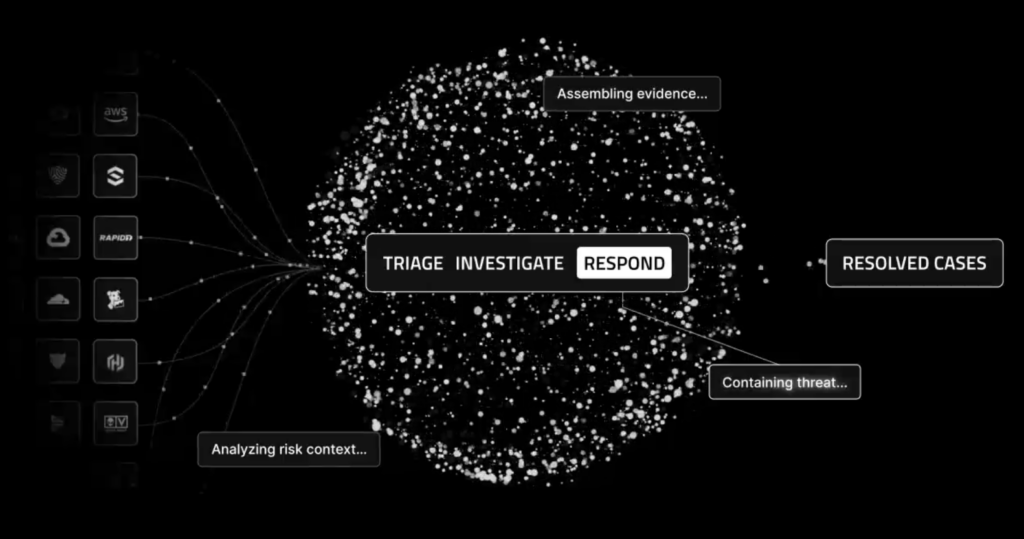
Best for: Enterprise SOCs automating complex investigation and response processes across multiple security vendors.
Torq combines Hyperautomation with agentic capabilities to connect alert enrichment, investigation, case management, and response. Its workflows can call security products, transform information, and coordinate actions that would otherwise require analysts to move between consoles. HyperAgents add investigative reasoning to these processes, while Auto Triage addresses repetitive alert assessment.
Key capabilities
- Hyperautomation workflow engine
- HyperAgents for multi-step investigations
- Auto Triage for alert deduplication and verdicts
- Socrates for agentic response orchestration
- Context Graph and Memory for investigation continuity
Strengths and considerations: Unlike an independent detection platform, Torq’s investigation scope is shaped by the evidence and actions exposed through connected tools. Teams should therefore assess integration depth alongside the quality of its agentic reasoning.
Evidence and review notes: Torq receives strong feedback for its visual workflow builder and integrations across security products. Reviewers report spending less time on repetitive alert triage, although complex workflows can become difficult to debug. Licensing complexity and the learning curve for advanced automation are recurring concerns.
6. Tines
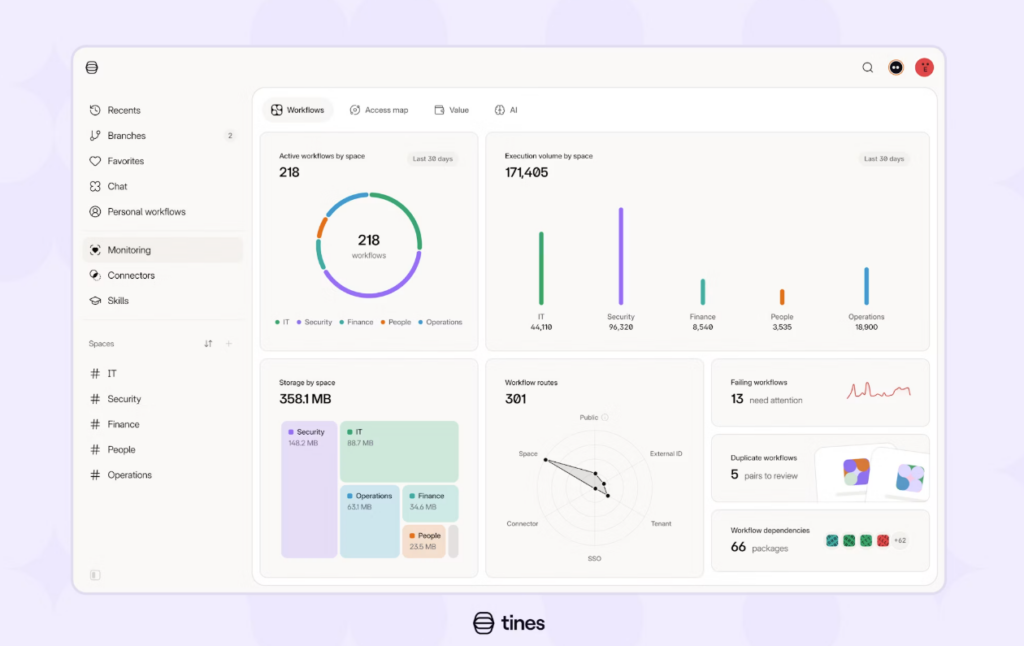
Best for: Security engineering teams and SOCs that want customizable automation with clear execution logic and auditability.
Tines builds automation around Stories: visual workflows that connect applications, transform data, evaluate conditions, and execute actions. Teams can build security processes without writing extensive integration code while keeping explicit control over workflow steps.
Its AI capabilities extend this model. AI Agent actions can reason within a Story, while Pages collect human input and approvals. Cases provide an operational workspace for tracking investigations.
Key capabilities
- Visual automation with Stories and Storyboard
- Workbench for natural-language workflow creation
- AI Agent actions within workflows
- Tines Pages for human approvals
- Tines Cases for investigation management
Strengths and considerations: Tines’ architecture works when the SOC wants AI to handle selected investigative tasks but needs predictable execution for sensitive actions. Detection and evidence still come from connected security systems.
Evidence and review notes: Tines users frequently praise its visual workflow design and flexibility, particularly for automating processes that span multiple applications. More complex workflows can require substantial debugging and connector configuration. Reviewers also raise concerns about pricing as automation usage grows.
7. Swimlane
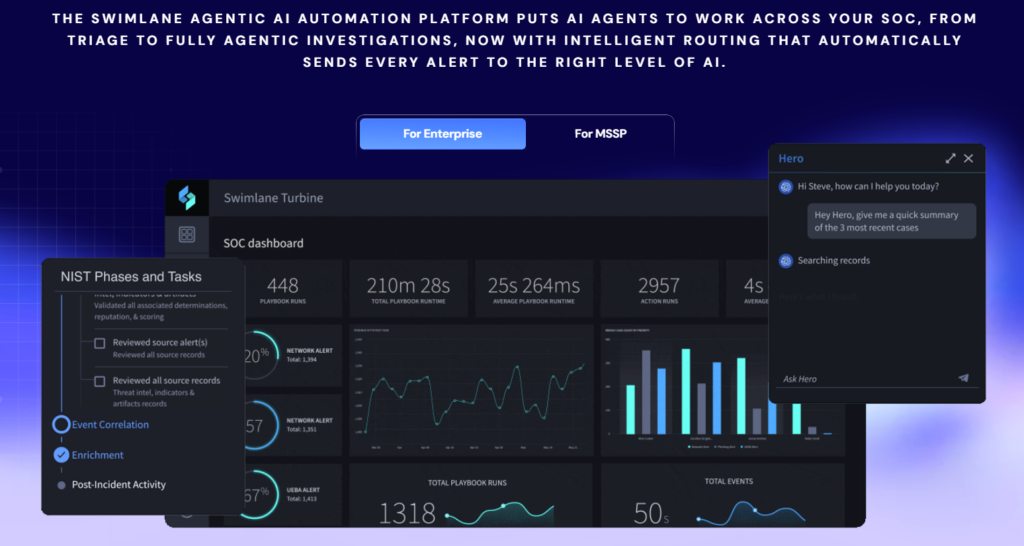
Best for: Large SOCs and MSSPs requiring customizable workflows and governed AI-assisted operations.
Swimlane combines its Turbine automation platform with Hero AI. Turbine provides the workflow and case-management foundation, while Hero AI assists analysts with case context, playbook creation, and automation components. Teams can use low-code tools to build operational workflows and add AI-assisted actions where they provide value.
Key capabilities
- Turbine Canvas low-code automation
- Hero AI Companion for case analysis
- Text-to-Playbook generation
- Hero AI Native Action for AI-powered workflow steps
- Component Builder for custom integrations
Strengths and considerations: Swimlane primarily coordinates work and reasoning across connected data. Its ability to investigate a threat depends on the underlying telemetry and the actions its workflows can perform.
Evidence and review notes: Swimlane customers value its low-code automation flexibility and ability to integrate different security systems into customized workflows. Main frustrations center on initial setup and ongoing maintenance, with some reviewers citing a steep learning curve and a cluttered interface.
Platform-native agentic SOC automation
Platform-native agents operate inside established security ecosystems. Their advantage is direct access to native security data, incident records, and response mechanisms, often reducing the integration work required to begin automating investigations.
However, licensed modules and the platform’s available telemetry limit their scope. Buyers should distinguish between generally available features and preview agents, and verify what each agent can do without analyst approval.
| Tool | Native data foundation | Agentic capability | Key dependency |
| Microsoft Security Copilot agents | Microsoft Defender | Phishing and security-alert triage | Supported Defender workloads |
| CrowdStrike Charlotte AI | Falcon | Detection triage and agentic SOAR | Falcon data and permissions |
| SentinelOne Purple AI | Singularity | Investigation and governed response | Singularity telemetry |
| Google Security Operations with Gemini | Google SecOps | Triage and Investigation Agent | SecOps configuration |
| Cortex AgentiX | Cortex security data and automation | Case Investigation Agent | Configured agent actions |
8. Microsoft Security Copilot agents
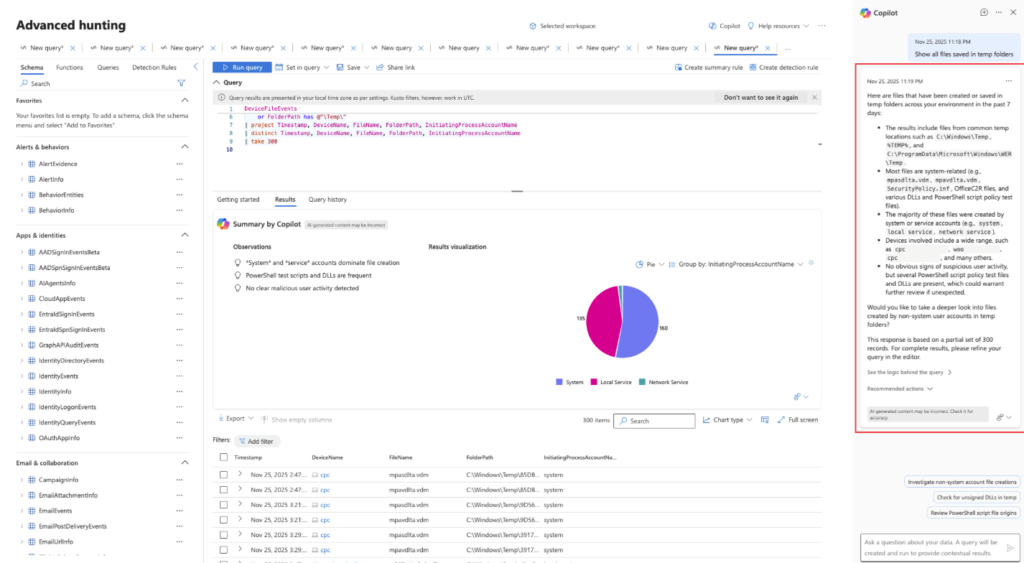
Best for: Microsoft-centric SOCs using Defender for email, endpoint, identity, and cloud security.
Microsoft Security Copilot agents automate supported security operations tasks within Microsoft Defender. The Phishing Triage Agent evaluates user-reported emails using message analysis, threat intelligence, and supporting investigation tools. Microsoft’s Security Alert Triage Agent extends that capability to selected additional alert types. It records classifications and reasoning in Defender incidents, helping analysts identify which cases require attention.
Key capabilities
- Phishing Triage Agent for reported emails
- Security Alert Triage Agent for supported alerts
- Defender email, URL, and attachment analysis
- Advanced Hunting integration
- Evidence-backed incident verdicts
Strengths and considerations: Microsoft Security Copilot agents benefit organizations already collecting security evidence in Microsoft’s ecosystem. It is not a universal autonomous investigator; its scope depends on supported alert types, workload licenses, and agent availability.
Evidence and review notes: Microsoft Security Copilot reviewers appreciate AI-assisted analysis and guidance within Microsoft’s security ecosystem. Access restrictions are a reported frustration, while licensing and cost warrant consideration during procurement. The published feedback largely covers Security Copilot as a whole rather than the newer autonomous triage agents.
9. CrowdStrike Charlotte AI
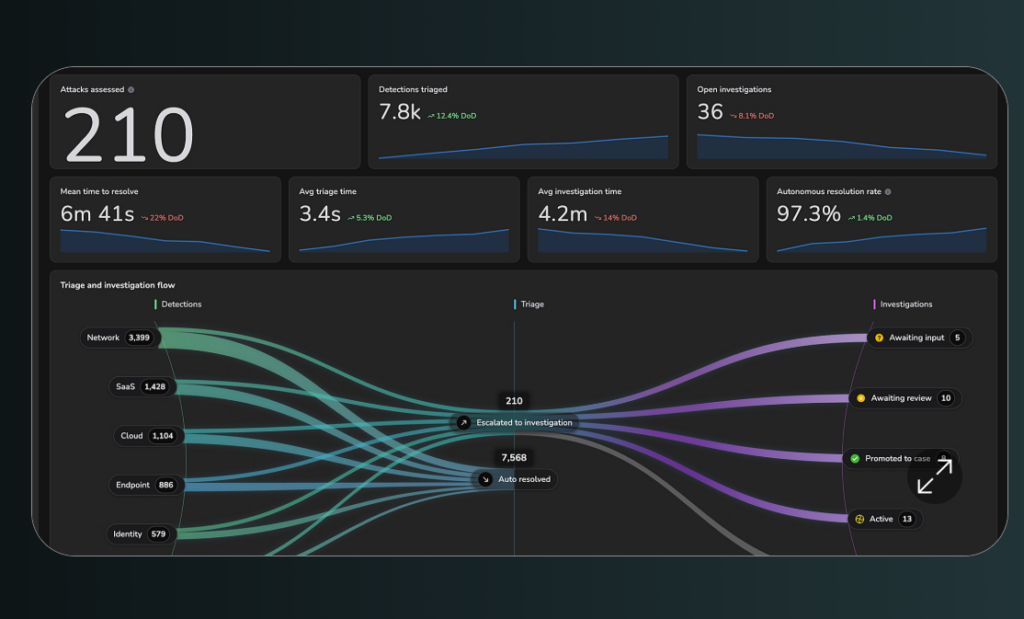
Best for: Falcon customers seeking automated detection triage, multi-domain investigation, and governed response within their existing security platform.
CrowdStrike Charlotte AI brings agentic investigation to Falcon security operations. It assesses detections using platform context and coordinates specialized investigative capabilities across supported security domains. Charlotte AI Detection Triage evaluates detections and explains dispositions. AgentWorks lets organizations create custom agents, while Charlotte Agentic SOAR connects agent reasoning to configured response workflows.
Key capabilities
- Charlotte AI Detection Triage
- Multi-agent endpoint, identity, and cloud investigation
- AgentWorks no-code agent creation
- Charlotte Agentic SOAR and Falcon Fusion workflows
- Configurable approval gates and audit trails
Strengths and considerations: The platform’s native integration is useful for Falcon-heavy environments because agents can work with existing security data and controls. Organizations should still verify which actions are available, how approvals are enforced, and what evidence can be accessed outside Falcon.
Evidence and review notes: Charlotte AI customers praise natural-language access to Falcon telemetry and faster incident triage. Several reviewers say it helps smaller teams handle more investigations without increasing manual effort. Premium pricing is a notable concern.
10. SentinelOne Purple AI
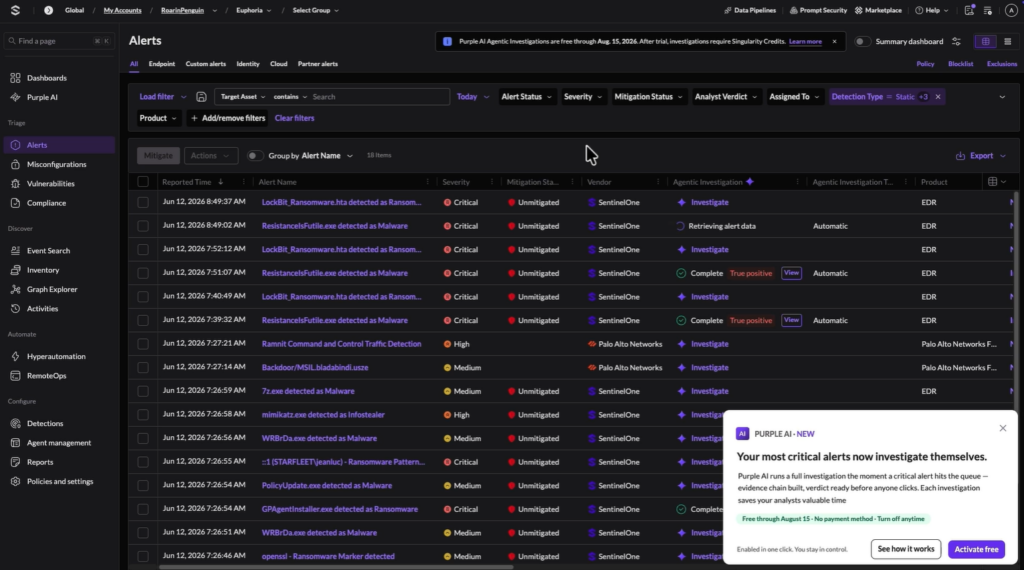
Best for: SOCs using SentinelOne Singularity that want to automate alert investigations and accelerate threat hunting.
SentinelOne Purple AI brings agentic investigation into the Singularity security platform. Its AI agents can investigate alerts, analyze supporting telemetry, and produce evidence-backed findings. The tool also supports natural-language threat hunting, allowing analysts to explore suspicious behavior without writing complex queries. Its investigations can draw on OCSF-normalized data from SentinelOne and connected third-party sources, helping establish incident context beyond a single detection.
Key capabilities
- Autonomous alert investigation
- Natural-language threat hunting
- Evidence-backed investigation findings
- Analysis of OCSF-normalized security telemetry
- AI-generated response recommendations
Strengths and considerations: For teams looking to automate remediation, Purple AI can pass investigation findings to Singularity Hyperautomation for execution through configured response workflows. Hyperautomation is a separate capability within the Singularity platform, not part of the tool’s core investigation engine.
Evidence and review notes: Purple AI users praise its natural-language threat hunting, faster investigations, and accessible incident summaries. Some reviewers report that responses to complex or high-severity alerts can be too generic, requiring additional manual investigation.
11. Google Security Operations with Gemini
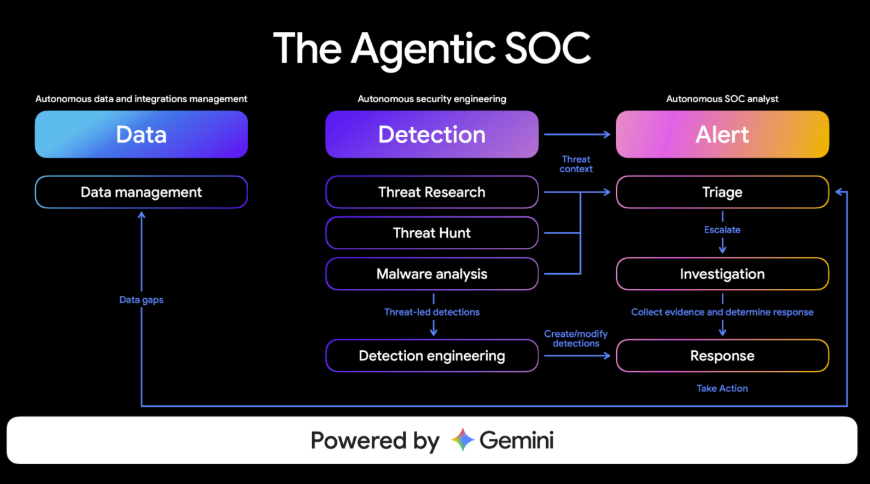
Best for: Google SecOps customers seeking AI-assisted investigation, alert triage, and playbook development within an existing security analytics environment.
Google Security Operations with Gemini combines security analytics with AI investigation features. Its Triage and Investigation Agent (TIN) evaluates supported alerts, executes an investigation plan, and provides a structured assessment of whether an alert is a true or false positive. Gemini also supports natural-language investigation and playbook creation, while case summaries help analysts understand findings and suggested next steps.
Key capabilities
- Triage and Investigation Agent (TIN)
- Gemini-assisted natural-language security searches
- AI-generated investigation summaries
- Gemini playbook generation and editing
- Agent investigation and usage dashboards
Strengths and considerations: Unlike a standalone AI triage service, these capabilities operate within the broader Google SecOps data and case-management environment. TIN’s deployment requirements matter: Google documents specific supported tenant configurations, so not every MSSP or multi-tenant architecture is automatically eligible.
Evidence and review notes: Users praise centralized investigation and AI-assisted searches. Reviewers also note the learning curve for advanced configuration and the effort required to set up certain integrations. Pricing predictability is another concern, particularly as data volumes increase.
12. Cortex AgentiX
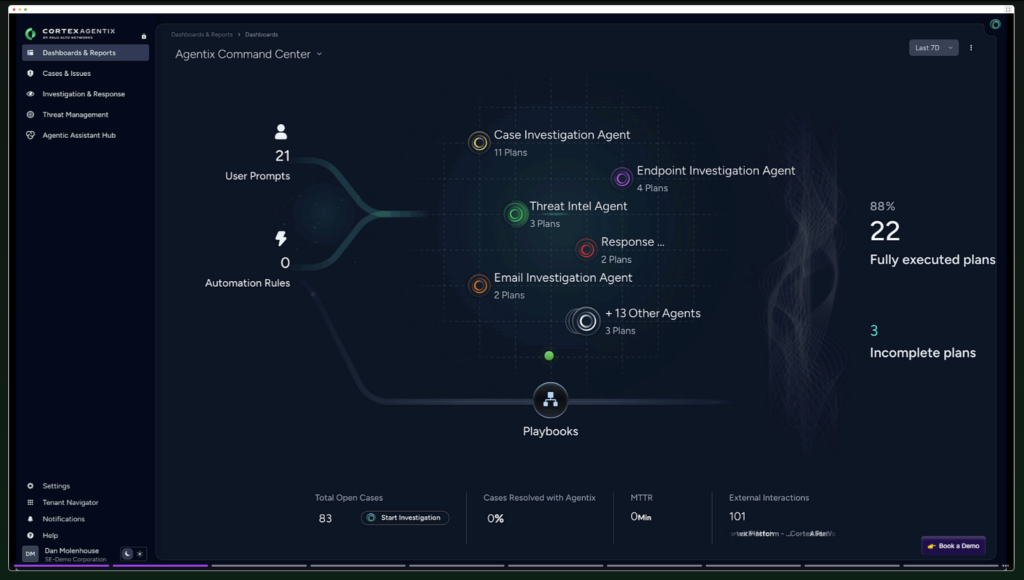
Best for: Enterprises using Palo Alto Networks Cortex products that need configurable AI agents with controlled access to investigation and response actions.
Cortex AgentiX brings agentic reasoning into Cortex security operations. Its Agentic Assistant allows analysts to interact with specialized agents that create and execute plans using assigned actions, including scripts, commands, and playbooks. The Case Investigation Agent works with case context to help analysts understand related issues, affected assets, and possible remediation steps. Through Agents Hub, administrators can configure agents and set which actions they can use.
Key capabilities
- Cortex Agentic Assistant
- Case Investigation Agent
- Threat Intel Agent
- Agents Hub for custom agent management
- Role-based permissions and governed agent actions
Strengths and considerations: AgentiX suits organizations that want adaptable AI workflows without giving agents unrestricted access to security infrastructure. Its capabilities remain bounded by configured access control policies and available automation actions.
Evidence and review notes: Reviews of Palo Alto Networks’ broader Cortex portfolio highlight the benefits of consolidated security visibility and flexible automation. There are no customer assessments of AgentiX.
How we selected and compared these SOC automation tools
We selected 12 tools based on their capabilities across SOC triage, detection, investigation, threat hunting, orchestration, and response. Our comparison draws on official vendor documentation and publicly available customer reviews. We did not conduct hands-on testing or customer interviews.
We grouped the tools by how they operate: autonomous investigation, cross-tool orchestration, or automation within an existing security platform. We examined whether each tool can independently detect threats or primarily investigates existing alerts, alongside its evidence sources, historical investigation capabilities, and response controls.
Capabilities and availability may vary by product version, licensing, and deployment. Customer reviews provide additional context but do not replace independent product testing.
How to choose a SOC automation tool
Start by identifying the cybersecurity gaps your SOC needs to address. Are analysts overwhelmed by alerts that need manual enrichment, or are threats going undetected because existing tools lack the historical evidence to uncover them? These problems require different approaches. Evaluate each tool against the specific gap you’re trying to close, including what initiates an investigation and what evidence the system can actually examine.
Test investigation quality against known incidents. Replay cases with verified outcomes and compare the agent’s conclusions with the underlying evidence. Can it establish the full scope of a compromise? Does it recognize related malware variants or historical activity? Test whether new threat intelligence can be applied to retained evidence, rather than relying on the original detection verdict.
Examine the work required to operate it. For orchestration platforms, assess integration maintenance and the effort needed to modify workflows. For platform-native agents, verify telemetry prerequisites and licensing dependencies. Measure analyst intervention and investigation accuracy alongside time saved.
Set response boundaries before enabling autonomy. Test how the system handles uncertain verdicts and false positives. Verify approval requirements for disruptive actions, permission scoping, and audit trails. An autonomous investigation should produce defensible findings; an autonomous response must also be safe to execute.
Frequently asked questions
What are SOC automation tools?
SOC automation tools automate security operations tasks such as alert triage, investigation, threat hunting, enrichment, case management, and incident response. They range from deterministic workflow engines to AI agents that perform multi-step investigations. Their effectiveness depends on available evidence, connected security products, and the response actions they can execute.
What is the best SOC automation tool for a small security team?
The best choice depends on the team’s workload and existing tools. An AI triage agent may help a small SOC overwhelmed by alerts, while an orchestration platform can reduce repetitive work across systems. Prioritize integration effort, operational oversight, evidence quality, and total cost rather than the number of advertised AI capabilities.
What should I look for when choosing a SOC automation tool?
Look for clear evidence access, investigation depth, historical visibility, response governance, and integration requirements. Ask whether the tool can discover threats independently of existing alerts and whether its findings are traceable to source evidence. A proof of value should measure investigation completeness and risk reduction, not simply alert-processing speed.
Evidence-first SOC investigation with Stairwell
Faster alert triage doesn’t make an environment safer when malware has already slipped past detection. Security teams need a way to investigate threats that never generated an alert in the first place.
Stairwell adds an independent evidence foundation to the AI SOC by collecting and retaining executable files from the customer’s environment. Its Backstory agentic investigator uses that evidence to uncover related malware variants, reconstruct campaign context, identify affected hosts, and guide remediation. Because the original evidence remains available, teams can also re-examine historical files when new intelligence emerges.
Find hidden threats and respond with defensible evidence. Book a demo to see how Stairwell investigates beyond the alert.
![Top 12 SOC Automation Tools for 2026 [By Category]](https://stairwell.com/wp-content/uploads/2026/10/Automation-Stairwell.jpg)